
Realtime voice
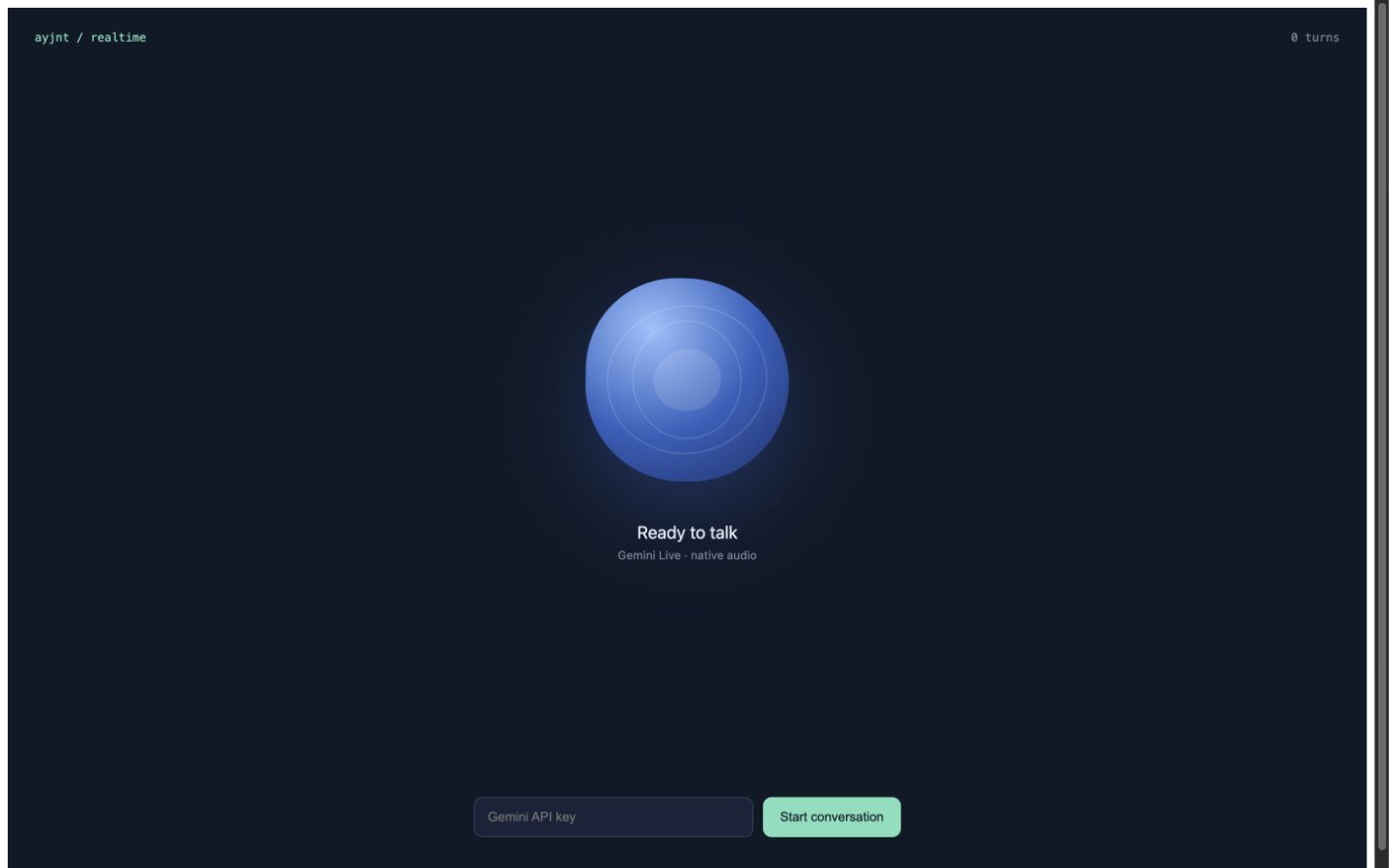
A Gemini-powered conversation with a fluid audio-reactive sphere that turns green while listening.
View source ↗Build it from an empty Ayjnt project
Follow the steps in order. Every source block below is the actual checked example file, so the tutorial and runnable project cannot quietly drift apart.
Scaffold and install
Create an empty harness and add only the dependencies this example needs.
bunx ayjnt new voice-harness --empty
cd voice-harness
bun install

# delete agents/alive after adding the files belowTrack durable voice usage
The agent keeps session and turn counters while the browser handles low-latency audio.
Create agents/voice/agent.ts with this source:
import { Agent, callable } from "ayjnt";

type State = {
  sessions: number;
  turns: number;
  lastConnectedAt: number | null;
};

export default class VoiceAgent extends Agent<State> {
  override initialState: State = {
    sessions: 0,
    turns: 0,
    lastConnectedAt: null,
  };

  @callable()
  async connected(): Promise<void> {
    this.setState({
      ...this.state,
      sessions: this.state.sessions + 1,
      lastConnectedAt: Date.now(),
    });
  }

  @callable()
  async completedTurn(): Promise<void> {
    this.setState({ ...this.state, turns: this.state.turns + 1 });
  }
}
Build the realtime interface
The browser connects to Gemini Live, captures the microphone, plays model audio, and drives the sphere from input and output energy.
Create agents/voice/app.tsx with this source:
import { useEffect, useRef, useState } from "react";
import { useAgent } from "@ayjnt/voice";

type Status = "idle" | "connecting" | "listening" | "speaking" | "error";
const ENDPOINT =
  "wss://generativelanguage.googleapis.com/ws/google.ai.generativelanguage.v1beta.GenerativeService.BidiGenerateContent";

export default function Voice() {
  const agent = useAgent();
  const [key, setKey] = useState("");
  const [status, setStatus] = useState<Status>("idle");
  const [level, setLevel] = useState(0);
  const [error, setError] = useState("");
  const session = useRef<LiveSession | null>(null);

  useEffect(() => () => session.current?.close(), []);

  const start = async () => {
    if (!key.trim()) return;
    setStatus("connecting");
    setError("");
    try {
      session.current = new LiveSession({
        apiKey: key.trim(),
        onStatus: setStatus,
        onLevel: setLevel,
        onTurn: () => agent.call("completedTurn", []),
      });
      await session.current.start();
      await agent.call("connected", []);
    } catch (cause) {
      setError(cause instanceof Error ? cause.message : String(cause));
      setStatus("error");
    }
  };

  const stop = () => {
    session.current?.close();
    session.current = null;
    setStatus("idle");
    setLevel(0);
  };

  return (
    <main style={styles.main}>
      <style>{css}</style>
      <header style={styles.header}>
        <span style={styles.brand}>ayjnt / realtime</span>
        <span style={styles.count}>{agent.state?.turns ?? 0} turns</span>
      </header>
      <section style={styles.stage}>
        <div
          className={`voice-orb ${status}`}
          style={{ "--level": Math.min(1, level).toFixed(3) } as React.CSSProperties}
        >
          <i></i><i></i><i></i>
        </div>
        <p style={styles.status}>
          {status === "idle" && "Ready to talk"}
          {status === "connecting" && "Connecting to Gemini…"}
          {status === "listening" && "Listening"}
          {status === "speaking" && "Speaking"}
          {status === "error" && "Connection ended"}
        </p>
        <p style={styles.hint}>
          {status === "listening"
            ? "Speak naturally. Gemini detects the end of your turn."
            : status === "speaking"
              ? "You can interrupt at any time."
              : "Gemini Live · native audio"}
        </p>
      </section>
      <footer style={styles.controls}>
        {status === "idle" || status === "error" ? (
          <>
            <input
              type="password"
              placeholder="Gemini API key"
              value={key}
              onChange={(event) => setKey(event.target.value)}
              style={styles.input}
              aria-label="Gemini API key"
            />
            <button onClick={start} disabled={!key.trim()} style={styles.start}>
              Start conversation
            </button>
          </>
        ) : (
          <button onClick={stop} style={styles.stop}>End conversation</button>
        )}
        {error && <p style={styles.error}>{error}</p>}
      </footer>
    </main>
  );
}

class LiveSession {
  private socket?: WebSocket;
  private inputContext?: AudioContext;
  private outputContext?: AudioContext;
  private stream?: MediaStream;
  private nextPlaybackAt = 0;
  private readonly options: {
    apiKey: string;
    onStatus: (status: Status) => void;
    onLevel: (level: number) => void;
    onTurn: () => void;
  };

  constructor(options: LiveSession["options"]) {
    this.options = options;
  }

  async start() {
    this.socket = new WebSocket(`${ENDPOINT}?key=${encodeURIComponent(this.options.apiKey)}`);
    await new Promise<void>((resolve, reject) => {
      this.socket!.onopen = () => resolve();
      this.socket!.onerror = () => reject(new Error("Could not connect to Gemini Live."));
    });
    this.socket.send(JSON.stringify({
      setup: {
        model: "models/gemini-3.1-flash-live-preview",
        responseModalities: ["AUDIO"],
        systemInstruction: {
          parts: [{ text: "Be warm, concise, and conversational. Help the person think out loud." }],
        },
        speechConfig: {
          voiceConfig: { prebuiltVoiceConfig: { voiceName: "Kore" } },
        },
      },
    }));
    this.socket.onmessage = (event) => this.receive(String(event.data));
    this.socket.onclose = () => this.options.onStatus("idle");
    await this.startMicrophone();
    this.options.onStatus("listening");
  }

  private async startMicrophone() {
    this.stream = await navigator.mediaDevices.getUserMedia({
      audio: { channelCount: 1, echoCancellation: true, noiseSuppression: true },
    });
    this.inputContext = new AudioContext();
    const source = this.inputContext.createMediaStreamSource(this.stream);
    const processor = this.inputContext.createScriptProcessor(4096, 1, 1);
    processor.onaudioprocess = (event) => {
      if (this.socket?.readyState !== WebSocket.OPEN) return;
      const input = event.inputBuffer.getChannelData(0);
      const pcm = downsample(input, this.inputContext!.sampleRate, 16_000);
      const peak = input.reduce((max, value) => Math.max(max, Math.abs(value)), 0);
      if (peak > 0.02) this.options.onLevel(peak);
      this.socket.send(JSON.stringify({
        realtimeInput: {
          audio: { data: bytesToBase64(new Uint8Array(pcm.buffer)), mimeType: "audio/pcm;rate=16000" },
        },
      }));
    };
    source.connect(processor);
    processor.connect(this.inputContext.destination);
  }

  private receive(raw: string) {
    const message = JSON.parse(raw);
    const content = message.serverContent;
    const parts = content?.modelTurn?.parts ?? [];
    for (const part of parts) {
      const data = part.inlineData?.data;
      if (data) void this.play(data);
    }
    if (parts.some((part: { inlineData?: unknown }) => part.inlineData)) {
      this.options.onStatus("speaking");
    }
    if (content?.turnComplete) {
      this.options.onTurn();
      window.setTimeout(() => this.options.onStatus("listening"), 180);
    }
  }

  private async play(base64: string) {
    this.outputContext ??= new AudioContext({ sampleRate: 24_000 });
    const bytes = Uint8Array.from(atob(base64), (char) => char.charCodeAt(0));
    const samples = new Int16Array(bytes.buffer);
    const buffer = this.outputContext.createBuffer(1, samples.length, 24_000);
    const channel = buffer.getChannelData(0);
    let peak = 0;
    for (let index = 0; index < samples.length; index++) {
      channel[index] = samples[index]! / 32768;
      peak = Math.max(peak, Math.abs(channel[index]!));
    }
    this.options.onLevel(peak);
    const source = this.outputContext.createBufferSource();
    source.buffer = buffer;
    source.connect(this.outputContext.destination);
    const start = Math.max(this.outputContext.currentTime, this.nextPlaybackAt);
    source.start(start);
    this.nextPlaybackAt = start + buffer.duration;
  }

  close() {
    this.socket?.close();
    this.stream?.getTracks().forEach((track) => track.stop());
    void this.inputContext?.close();
    void this.outputContext?.close();
  }
}

function downsample(input: Float32Array, sourceRate: number, targetRate: number) {
  const ratio = sourceRate / targetRate;
  const output = new Int16Array(Math.floor(input.length / ratio));
  for (let index = 0; index < output.length; index++) {
    const sample = input[Math.floor(index * ratio)] ?? 0;
    output[index] = Math.max(-1, Math.min(1, sample)) * 32767;
  }
  return output;
}

function bytesToBase64(bytes: Uint8Array) {
  let binary = "";
  for (const byte of bytes) binary += String.fromCharCode(byte);
  return btoa(binary);
}

const styles = {
  main: { minHeight: "100vh", display: "grid", gridTemplateRows: "auto 1fr auto", background: "#101827", color: "#f7f8fb", fontFamily: "system-ui, sans-serif" },
  header: { display: "flex", justifyContent: "space-between", padding: "24px 28px", fontFamily: "monospace", fontSize: 12 },
  brand: { color: "#7be0bd" },
  count: { color: "#7d8797" },
  stage: { display: "grid", placeItems: "center", alignContent: "center" },
  status: { margin: "42px 0 6px", fontSize: 18 },
  hint: { margin: 0, color: "#7d8797", fontSize: 12 },
  controls: { display: "flex", justifyContent: "center", flexWrap: "wrap" as const, gap: 10, padding: "25px 20px 40px" },
  input: { width: 260, padding: "12px 14px", borderRadius: 9, border: "1px solid #334158", background: "#182338", color: "white", outline: "none" },
  start: { padding: "12px 18px", border: 0, borderRadius: 9, background: "#7be0bd", color: "#101827", cursor: "pointer" },
  stop: { padding: "12px 22px", border: "1px solid #de6c61", borderRadius: 99, background: "transparent", color: "#ff9f94", cursor: "pointer" },
  error: { flexBasis: "100%", textAlign: "center" as const, color: "#ff9f94", fontSize: 12 },
};

const css = `
.voice-orb { --level: 0; width: 210px; height: 210px; position: relative; border-radius: 45% 55% 52% 48%; background: radial-gradient(circle at 32% 25%, #98c2ff, #315fbd 52%, #182f69); transform: scale(calc(1 + var(--level) * .18)); transition: transform .08s linear, background .35s; box-shadow: 0 28px 90px rgba(49,95,189,.4); animation: drift 7s ease-in-out infinite; }
.voice-orb.listening { background: radial-gradient(circle at 32% 25%, #c1ffe5, #52ca9d 52%, #17674e); box-shadow: 0 28px 90px rgba(82,202,157,.34); }
.voice-orb.speaking { animation-duration: 2.8s; }
.voice-orb i { position:absolute; inset:12%; border:1px solid rgba(255,255,255,.2); border-radius:55% 45%; animation:spin 9s linear infinite; }
.voice-orb i:nth-child(2){ inset:22%; animation-direction:reverse; animation-duration:6s; }
.voice-orb i:nth-child(3){ inset:34%; background:rgba(255,255,255,.12); border:0; }
@keyframes drift { 0%,100%{border-radius:45% 55% 52% 48%; transform:rotate(0) scale(calc(1 + var(--level) * .18))} 50%{border-radius:58% 42% 39% 61%; transform:rotate(10deg) scale(calc(1.03 + var(--level) * .18))} }
@keyframes spin { to { transform:rotate(360deg) } }
`;
Add the local secret
Put provider credentials in .dev.vars. This file
stays local and should not be committed.
GEMINI_API_KEY=your-keyRun the harness
bun run build
bun run dev

# open http://localhost:8787/voice/demo
The build step generates bindings, migrations, client hooks, and environment types before the runtime starts.
Project shape
Verify your result
- Allow microphone access and press Start conversation.
- The sphere turns green while listening and reacts while Gemini speaks.
- Refresh the route and confirm the durable session counters remain.